



-
DİKKAT DOSYA İndirmek/Yüklemek için ÜCRETLİ ALTIN ÜYELİK Gereklidir!
Altın Üyelik Hakkında Bilgi
Çok eski bir web tarayıcısı kullanıyorsunuz. Bu veya diğer siteleri görüntülemekte sorunlar yaşayabilirsiniz..
Tarayıcınızı güncellemeli veya alternatif bir tarayıcı kullanmalısınız.
Tarayıcınızı güncellemeli veya alternatif bir tarayıcı kullanmalısınız.
Listwiev Listeleme Problemi
- Konbuyu başlatan Ercan6321
- Başlangıç tarihi

- Katılım
- 5 Haziran 2006
- Mesajlar
- 6,886
- Excel Vers. ve Dili
- 2021 Türkçe
Merhaba.
Tools / Referances seçin aşağıdaki görselde seçili olan referansı ekleyin.
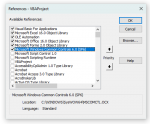
Tools / Referances seçin aşağıdaki görselde seçili olan referansı ekleyin.
Reference de bulamadım. Yok SanirimMerhaba.
Tools / Referances seçin aşağıdaki görselde seçili olan referansı ekleyin.
Ekli dosyayı görüntüle 240952
- Katılım
- 5 Haziran 2006
- Mesajlar
- 6,886
- Excel Vers. ve Dili
- 2021 Türkçe
Forma yeni bir listview ekleyin.
Otomatik eklenecektir. Eklediğiniz listviewi daha sonra silebilirsiniz.
Otomatik eklenecektir. Eklediğiniz listviewi daha sonra silebilirsiniz.
Malesef goremedim. Cok dikkatli bakmama rağmen. Başka yolu ya da farkı bi ismi var mi acabaForma yeni bir listview ekleyin.
Otomatik eklenecektir. Eklediğiniz listviewi daha sonra silebilirsiniz.
- Katılım
- 5 Haziran 2006
- Mesajlar
- 6,886
- Excel Vers. ve Dili
- 2021 Türkçe
Neyi göremediniz?
Forma yeni bir listview ekleyin dedim siz ne aradınız?
Forma yeni bir listview ekleyin dedim siz ne aradınız?
Dediğinizi yaptim fakat hata devam etti.Neyi göremediniz?
Forma yeni bir listview ekleyin dedim siz ne aradınız?
- Katılım
- 5 Haziran 2006
- Mesajlar
- 6,886
- Excel Vers. ve Dili
- 2021 Türkçe

- Katılım
- 15 Mart 2005
- Mesajlar
- 43,804
- Excel Vers. ve Dili
- Microsoft 365 Tr-En 64 Bit
Eğer 64 bit excel kullanıyorsanız ListView hata verecektir.
Merhaba Korhan Bey. Windows 7 32 bit Office kullanıyorum. ListView üzerinde çalışmak istemiştim. O konuda da kendime bir şeyler katmak istedim fakat hatalar oluşunca ertelemem gerekiyor sanırım.Eğer 64 bit excel kullanıyorsanız ListView hata verecektir.
- Katılım
- 15 Mart 2005
- Mesajlar
- 43,804
- Excel Vers. ve Dili
- Microsoft 365 Tr-En 64 Bit
Paylaştığınız dosyada veriler DB sayfasından sorgulanıyor. Fakat bu sayfa dosyanızda boş görünüyor.
Kodu aşağıdaki gibi değiştirip deneyiniz.
Kodu aşağıdaki gibi değiştirip deneyiniz.
C++:
Sub calisanListele()
    Dim lst As Object
    Dim ws As Worksheet
    Dim ss As Long
    Dim x As Long
    Dim ed As String

    lstCalisanlar.ListItems.Clear
    Set ws = Sheets("AnaSayfa")
    ss = ws.Range("A5000").End(xlUp).Row

    For x = 2 To ss
        Set lst = lstCalisanlar.ListItems.Add(Text:=ws.Range("A" & x))
        lst.SubItems(1) = ws.Range("B" & x)
        lst.SubItems(2) = ws.Range("C" & x)
        lst.SubItems(3) = ws.Range("D" & x)
        lst.SubItems(4) = ws.Range("E" & x)

        If lst.SubItems(4) = "İLKÖĞRETİM" Then ed = 1
        If lst.SubItems(4) = "LİSE" Then ed = 2
        If lst.SubItems(4) = "ÖNLİSANS" Then ed = 3
        If lst.SubItems(4) = "LİSANS" Then ed = 4

        If ed = 1 Then
            lst.ForeColor = &HFF&
            lst.ListSubItems(1).ForeColor = &HFF&
            lst.ListSubItems(2).ForeColor = &HFF&
            lst.ListSubItems(3).ForeColor = &HFF&
            lst.ListSubItems(4).ForeColor = &HFF&
        End If
        If ed = 2 Then
            lst.ForeColor = &HFF00&
            lst.ListSubItems(1).ForeColor = &HFF00&
            lst.ListSubItems(2).ForeColor = &HFF00&
            lst.ListSubItems(3).ForeColor = &HFF00&
            lst.ListSubItems(4).ForeColor = &HFF00&
        End If
        If ed = 3 Then
            lst.ForeColor = &HFF00FF
            lst.ListSubItems(1).ForeColor = &HFF00FF
            lst.ListSubItems(2).ForeColor = &HFF00FF
            lst.ListSubItems(3).ForeColor = &HFF00FF
            lst.ListSubItems(4).ForeColor = &HFF00FF
        End If
    Next

    Set ws = Nothing
End Subşimdi düzeldi. Elinize SağlıkPaylaştığınız dosyada veriler DB sayfasından sorgulanıyor. Fakat bu sayfa dosyanızda boş görünüyor.
Kodu aşağıdaki gibi değiştirip deneyiniz.
C++:Sub calisanListele() Dim lst As Object Dim ws As Worksheet Dim ss As Long Dim x As Long Dim ed As String lstCalisanlar.ListItems.Clear Set ws = Sheets("AnaSayfa") ss = ws.Range("A5000").End(xlUp).Row For x = 2 To ss Set lst = lstCalisanlar.ListItems.Add(Text:=ws.Range("A" & x)) lst.SubItems(1) = ws.Range("B" & x) lst.SubItems(2) = ws.Range("C" & x) lst.SubItems(3) = ws.Range("D" & x) lst.SubItems(4) = ws.Range("E" & x) If lst.SubItems(4) = "İLKÖĞRETİM" Then ed = 1 If lst.SubItems(4) = "LİSE" Then ed = 2 If lst.SubItems(4) = "ÖNLİSANS" Then ed = 3 If lst.SubItems(4) = "LİSANS" Then ed = 4 If ed = 1 Then lst.ForeColor = &HFF& lst.ListSubItems(1).ForeColor = &HFF& lst.ListSubItems(2).ForeColor = &HFF& lst.ListSubItems(3).ForeColor = &HFF& lst.ListSubItems(4).ForeColor = &HFF& End If If ed = 2 Then lst.ForeColor = &HFF00& lst.ListSubItems(1).ForeColor = &HFF00& lst.ListSubItems(2).ForeColor = &HFF00& lst.ListSubItems(3).ForeColor = &HFF00& lst.ListSubItems(4).ForeColor = &HFF00& End If If ed = 3 Then lst.ForeColor = &HFF00FF lst.ListSubItems(1).ForeColor = &HFF00FF lst.ListSubItems(2).ForeColor = &HFF00FF lst.ListSubItems(3).ForeColor = &HFF00FF lst.ListSubItems(4).ForeColor = &HFF00FF End If Next Set ws = Nothing End Sub
-
Sizlere daha iyi bir deneyim sunabilmek icin sitemizde çerez konumlandırmaktayız, web sitemizi kullanmaya devam ettiğinizde çerezler ile toplanan kişisel verileriniz Veri Politikamız / Bilgilendirmelerimizde belirtilen amaçlar ve yöntemlerle mevzuatına uygun olarak kullanılacaktır.