



muratgunay48
Altın Üye
- Katılım
- 10 Şubat 2010
- Mesajlar
- 1,494
- Excel Vers. ve Dili
- Office 365 - Türkçe (64 bit)
DOSYA İndirmek/Yüklemek için ÜCRETLİ ALTIN ÜYELİK Gereklidir!
Altın Üyelik Hakkında Bilgi

Private Sub Workbook_Open()
    ' Ribbon'u gizle
    Application.ExecuteExcel4Macro "SHOW.TOOLBAR(""Ribbon"",False)"

    ' Formül çubuğunu gizle
    Application.DisplayFormulaBar = False

    ' Durum çubuğunu gizle
    Application.DisplayStatusBar = False

End Sub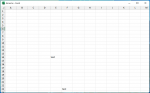
Deneyiniz,
C++:Private Sub Workbook_Open() ' Ribbon'u gizle Application.ExecuteExcel4Macro "SHOW.TOOLBAR(""Ribbon"",False)" ' Formül çubuğunu gizle Application.DisplayFormulaBar = False ' Durum çubuğunu gizle Application.DisplayStatusBar = False End Sub
Ekli dosyayı görüntüle 255953
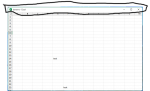
Anladım hocam. Yine de teşekkür ederim.O satır Excel'in değil, Windows işletim sisteminin parçası, kaldırılabileceğini düşünmüyorum.

FullScreenMode her şeyi gizler RestoreScreenMode geri getirirPrivate Declare PtrSafe Function FindWindow Lib "user32" Alias "FindWindowA" (ByVal lpClassName As String, ByVal lpWindowName As String) As LongPtr
Private Declare PtrSafe Function GetWindowLong Lib "user32" Alias "GetWindowLongA" (ByVal hWnd As LongPtr, ByVal nIndex As Long) As Long
Private Declare PtrSafe Function SetWindowLong Lib "user32" Alias "SetWindowLongA" (ByVal hWnd As LongPtr, ByVal nIndex As Long, ByVal dwNewLong As Long) As Long
Private Declare PtrSafe Function DrawMenuBar Lib "user32" (ByVal hWnd As LongPtr) As Long
Const GWL_STYLE = (-16)
Const WS_CAPTION = &HC00000
Const WS_THICKFRAME = &H40000
Sub FullScreenMode()
Dim hWnd As LongPtr
Application.DisplayFullScreen = True
Application.DisplayFormulaBar = False
Application.DisplayStatusBar = False
ActiveWindow.DisplayHeadings = False
ActiveWindow.DisplayWorkbookTabs = False
hWnd = FindWindow("XLMAIN", Application.Caption)
SetWindowLong hWnd, GWL_STYLE, GetWindowLong(hWnd, GWL_STYLE) And Not WS_CAPTION And Not WS_THICKFRAME
DrawMenuBar hWnd
End Sub
Sub RestoreScreenMode()
Application.DisplayFullScreen = False
Application.DisplayFormulaBar = True
Application.DisplayStatusBar = True
ActiveWindow.DisplayHeadings = True
ActiveWindow.DisplayWorkbookTabs = True
Dim hWnd As LongPtr
hWnd = FindWindow("XLMAIN", Application.Caption)
SetWindowLong hWnd, GWL_STYLE, GetWindowLong(hWnd, GWL_STYLE) Or WS_CAPTION Or WS_THICKFRAME
DrawMenuBar hWnd
End SubApi kodları ile mümkün.
Yeni bir modüle oluşturup aşağıdaki kodları kopyalayın.
FullScreenModeher şeyi gizlerRestoreScreenModegeri getirir
Kod:Private Declare PtrSafe Function FindWindow Lib "user32" Alias "FindWindowA" (ByVal lpClassName As String, ByVal lpWindowName As String) As LongPtr Private Declare PtrSafe Function GetWindowLong Lib "user32" Alias "GetWindowLongA" (ByVal hWnd As LongPtr, ByVal nIndex As Long) As Long Private Declare PtrSafe Function SetWindowLong Lib "user32" Alias "SetWindowLongA" (ByVal hWnd As LongPtr, ByVal nIndex As Long, ByVal dwNewLong As Long) As Long Private Declare PtrSafe Function DrawMenuBar Lib "user32" (ByVal hWnd As LongPtr) As Long Const GWL_STYLE = (-16) Const WS_CAPTION = &HC00000 Const WS_THICKFRAME = &H40000 Sub FullScreenMode() Dim hWnd As LongPtr Application.DisplayFullScreen = True Application.DisplayFormulaBar = False Application.DisplayStatusBar = False ActiveWindow.DisplayHeadings = False ActiveWindow.DisplayWorkbookTabs = False hWnd = FindWindow("XLMAIN", Application.Caption) SetWindowLong hWnd, GWL_STYLE, GetWindowLong(hWnd, GWL_STYLE) And Not WS_CAPTION And Not WS_THICKFRAME DrawMenuBar hWnd End Sub Sub RestoreScreenMode() Application.DisplayFullScreen = False Application.DisplayFormulaBar = True Application.DisplayStatusBar = True ActiveWindow.DisplayHeadings = True ActiveWindow.DisplayWorkbookTabs = True Dim hWnd As LongPtr hWnd = FindWindow("XLMAIN", Application.Caption) SetWindowLong hWnd, GWL_STYLE, GetWindowLong(hWnd, GWL_STYLE) Or WS_CAPTION Or WS_THICKFRAME DrawMenuBar hWnd End Sub
Private Declare PtrSafe Function FindWindow Lib "user32" Alias "FindWindowA" (ByVal lpClassName As String, ByVal lpWindowName As String) As LongPtr
Private Declare PtrSafe Function GetWindowLong Lib "user32" Alias "GetWindowLongA" (ByVal hWnd As LongPtr, ByVal nIndex As Long) As Long
Private Declare PtrSafe Function SetWindowLong Lib "user32" Alias "SetWindowLongA" (ByVal hWnd As LongPtr, ByVal nIndex As Long, ByVal dwNewLong As Long) As Long
Private Declare PtrSafe Function DrawMenuBar Lib "user32" (ByVal hWnd As LongPtr) As Long

Const GWL_STYLE = (-16)
Const WS_CAPTION = &HC00000
Const WS_THICKFRAME = &H40000
Const WS_MINIMIZEBOX = &H20000
Const WS_MAXIMIZEBOX = &H10000

Sub CustomScreenMode()
    Dim hWnd As LongPtr

    Application.ExecuteExcel4Macro "SHOW.TOOLBAR(""Ribbon"",False)"
    Application.DisplayFormulaBar = False
    Application.DisplayStatusBar = False
    ActiveWindow.DisplayHeadings = False
    ActiveWindow.DisplayWorkbookTabs = False


    hWnd = FindWindow("XLMAIN", Application.Caption)
    If hWnd <> 0 Then
        SetWindowLong hWnd, GWL_STYLE, GetWindowLong(hWnd, GWL_STYLE) And Not WS_CAPTION And Not WS_THICKFRAME And Not WS_MINIMIZEBOX And Not WS_MAXIMIZEBOX
        DrawMenuBar hWnd
    End If
End Sub

Sub RestoreScreenMode()
    Dim hWnd As LongPtr

    Application.ExecuteExcel4Macro "SHOW.TOOLBAR(""Ribbon"",True)"
    Application.DisplayFormulaBar = True
    Application.DisplayStatusBar = True
    ActiveWindow.DisplayHeadings = True
    ActiveWindow.DisplayWorkbookTabs = True


    hWnd = FindWindow("XLMAIN", Application.Caption)
    If hWnd <> 0 Then
        SetWindowLong hWnd, GWL_STYLE, GetWindowLong(hWnd, GWL_STYLE) Or WS_CAPTION Or WS_THICKFRAME Or WS_MINIMIZEBOX Or WS_MAXIMIZEBOX
        DrawMenuBar hWnd
    End If
End SubBu kodu kullanın.
Kod:Private Declare PtrSafe Function FindWindow Lib "user32" Alias "FindWindowA" (ByVal lpClassName As String, ByVal lpWindowName As String) As LongPtr Private Declare PtrSafe Function GetWindowLong Lib "user32" Alias "GetWindowLongA" (ByVal hWnd As LongPtr, ByVal nIndex As Long) As Long Private Declare PtrSafe Function SetWindowLong Lib "user32" Alias "SetWindowLongA" (ByVal hWnd As LongPtr, ByVal nIndex As Long, ByVal dwNewLong As Long) As Long Private Declare PtrSafe Function DrawMenuBar Lib "user32" (ByVal hWnd As LongPtr) As Long Const GWL_STYLE = (-16) Const WS_CAPTION = &HC00000 Const WS_THICKFRAME = &H40000 Const WS_MINIMIZEBOX = &H20000 Const WS_MAXIMIZEBOX = &H10000 Sub CustomScreenMode() Dim hWnd As LongPtr Application.ExecuteExcel4Macro "SHOW.TOOLBAR(""Ribbon"",False)" Application.DisplayFormulaBar = False Application.DisplayStatusBar = False ActiveWindow.DisplayHeadings = False ActiveWindow.DisplayWorkbookTabs = False hWnd = FindWindow("XLMAIN", Application.Caption) If hWnd <> 0 Then SetWindowLong hWnd, GWL_STYLE, GetWindowLong(hWnd, GWL_STYLE) And Not WS_CAPTION And Not WS_THICKFRAME And Not WS_MINIMIZEBOX And Not WS_MAXIMIZEBOX DrawMenuBar hWnd End If End Sub Sub RestoreScreenMode() Dim hWnd As LongPtr Application.ExecuteExcel4Macro "SHOW.TOOLBAR(""Ribbon"",True)" Application.DisplayFormulaBar = True Application.DisplayStatusBar = True ActiveWindow.DisplayHeadings = True ActiveWindow.DisplayWorkbookTabs = True hWnd = FindWindow("XLMAIN", Application.Caption) If hWnd <> 0 Then SetWindowLong hWnd, GWL_STYLE, GetWindowLong(hWnd, GWL_STYLE) Or WS_CAPTION Or WS_THICKFRAME Or WS_MINIMIZEBOX Or WS_MAXIMIZEBOX DrawMenuBar hWnd End If End Sub