• DİKKAT

    DOSYA İndirmek/Yüklemek için ÜCRETLİ ALTIN ÜYELİK Gereklidir!
    Altın Üyelik Hakkında Bilgi

2 textbox karşılaştırma ve sonucu 3. textboxa yazma

catalinastrap

Özgür
Destek Ekibi
Katılım
19 Ağustos 2006
Mesajlar
644
Excel Vers. ve Dili
Microsoft® Excel® Microsoft 365 için MSO /64 bit /Türkçe
Merhabalar
1.textbox ta tarih 28.01.2019
2.textbox ta gün sayısı (burası değişken) 10
3.textboxa 06.02.2019 yazdırmalıyım (hesaplatarak)


yardımcı olabilirmisiniz ?
 
Son düzenleme:
Bu şekilde deneyin.
Kod:
Private Sub CommandButton1_Click()
 TextBox3 = Format(Format(TextBox1.Value, "00000") + TextBox2.Value * 1, "dd/mm/yyyy")
End Sub
 
Bu şekilde deneyin.
Kod:
Private Sub CommandButton1_Click()
TextBox3 = Format(Format(TextBox1.Value, "00000") + TextBox2.Value * 1, "dd/mm/yyyy")
End Sub


Merhaba;
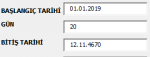
hesap hatası alıyorum
 

Ekli dosyalar

  • HESAP.PNG
    HESAP.PNG
    2.3 KB · Görüntüleme: 4
yine aynı şekilde oldu

Merhaba,
ekli kodları dener misin


Kod:
Public Sub UserForm_Initialize()

    TextBox1 = Format(TextBox1, "dd.mm.yyyy")

    TextBox2 = Format(TextBox1, "0.0")
    TextBox2.Value = 0
    
    TextBox3 = Format(TextBox3, "dd.mm.yyyy")
           
End Sub
Kod:
Private Sub CommandButton1_Click()

Dim d1 As Date, d3 As Date
Dim a2 As Double

Dim dDate As Date

Dim LValue As Boolean

TextBox1.Value = Format(TextBox1.Value, "dd.mm.yyyy")

LValue = IsDate(TextBox1)
  
  
  If LValue = False Then
  
    dDate = DateSerial(Year(Date), Month(Date), Day(Date))
    
    TextBox1.Value = dDate
    
  End If       

d1 = TextBox1.Value

a2 = TextBox2.Value

If Len(a2) = 0 Then a2 = 0

d3 = DateAdd("d", a2, d1)

TextBox3 = d3

End Sub
Kod:
Private Sub TextBox1_BeforeUpdate(ByVal Cancel As MSForms.ReturnBoolean)


    If Mid(TextBox1.Value, 4, 2) > 12 Then
    
    MsgBox Mid(TextBox1.Value, 4, 2)
        MsgBox "Invalid date, please re-enter", vbCritical
        TextBox1.Value = vbNullString
        TextBox1.SetFocus
        Exit Sub
        
    End If
    
    
    End Sub
 
Merhaba,
ekli kodları dener misin


Kod:
Public Sub UserForm_Initialize()

    TextBox1 = Format(TextBox1, "dd.mm.yyyy")

    TextBox2 = Format(TextBox1, "0.0")
    TextBox2.Value = 0
   
    TextBox3 = Format(TextBox3, "dd.mm.yyyy")
          
End Sub
Kod:
Private Sub CommandButton1_Click()

Dim d1 As Date, d3 As Date
Dim a2 As Double

Dim dDate As Date

Dim LValue As Boolean

TextBox1.Value = Format(TextBox1.Value, "dd.mm.yyyy")

LValue = IsDate(TextBox1)
 
 
  If LValue = False Then
 
    dDate = DateSerial(Year(Date), Month(Date), Day(Date))
   
    TextBox1.Value = dDate
   
  End If      

d1 = TextBox1.Value

a2 = TextBox2.Value

If Len(a2) = 0 Then a2 = 0

d3 = DateAdd("d", a2, d1)

TextBox3 = d3

End Sub
Kod:
Private Sub TextBox1_BeforeUpdate(ByVal Cancel As MSForms.ReturnBoolean)


    If Mid(TextBox1.Value, 4, 2) > 12 Then
   
    MsgBox Mid(TextBox1.Value, 4, 2)
        MsgBox "Invalid date, please re-enter", vbCritical
        TextBox1.Value = vbNullString
        TextBox1.SetFocus
        Exit Sub
       
    End If
   
   
    End Sub

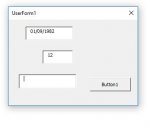
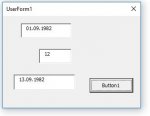
Çok teşekkür ederim bu şekilde oldu ancak küçük bir detay var ialve edebilirsek sevinirim tarihi 01/01/2019 şeklinde girersek çalışıyor 01.01.2019 şeklinde girince çalışır hale getirebilirmiyiz
 
Çok teşekkür ederim bu şekilde oldu ancak küçük bir detay var ialve edebilirsek sevinirim tarihi 01/01/2019 şeklinde girersek çalışıyor 01.01.2019 şeklinde girince çalışır hale getirebilirmiyiz


Benim makinede iki şekilde de çalışıyor ama; Bu konuda diğer Üstadlar daha iyi yardımcı olacaktır....

iyi çalışmalar.
 

Ekli dosyalar

  • TextB1.JPG
    TextB1.JPG
    16.6 KB · Görüntüleme: 2
  • TextB2.JPG
    TextB2.JPG
    17 KB · Görüntüleme: 2
Geri
Üst